VP3 CORTEX Agentic Operating System

The Voice-First Runtime for Everything You Do

VP3 is a voice-first, API-connected interaction runtime. Request information, trigger tasks, and engage with structured data layers through verbal navigation, camera-assisted interaction, motion input, and visual interface components.

7
Runtime Layers
9
Core Modules
7
Build Phases
6
Input Modes
A Controlled Application Shell. Not a Browser.
VP3 operates as a controlled application shell that accesses internet resources and APIs on user request, processes results in-app, and renders purpose-built interaction layers. It is not intended to function as a general-purpose web browser.
🎤
Voice-First Interaction Runtime
All major workflows are designed so they can be initiated, advanced, and completed through verbal commands. Voice is the primary interaction method.
Primary InputAlways Listening
🌐
Network-Enabled Application Shell
Expose internet and API access in a deliberate, product-defined way. Raw external responses are normalized into VP3-friendly schemas before reaching the renderer.
API BrokerControlled Access
👁
Multimodal Interface System
Microphone, camera, and motion inputs are foundational product systems. Interaction priority: voice first, then camera/motion, then pointer/touch/manual controls.
CameraMotionGesture
Structured Task Platform
Accept user requests through voice and complementary inputs. Retrieve, process, normalize, and render data. Let users navigate and act on information verbally and visually.
Task EngineData Pipeline
💻
Controlled Rendering Environment
Visual UI exists to support comprehension, confirmation, comparison, and action. UI should not require heavy manual navigation when a verbal path can be provided.
CardsPanelsDashboards
🔒
Security-First Architecture
Because VP3 mixes device access, internet access, and structured user actions, security boundaries are established at the start of development rather than added later.
IPC ValidationSandboxed
Seven Layers. One Voice.
VP3 is built as a controlled desktop runtime using a Chromium-based shell. The architecture is separated into seven logical layers, each with clear boundaries and responsibilities.
🖥
Application Shell
Desktop windowing, runtime boot, session policies, and device permission handling. The shell creates the main application window, controls navigation, defines allowed routes/origins, and manages app lifecycle events.
main.jsElectronWindow Config
🎙
Input Layer
Microphone capture, speech-to-text integration, camera input, and motion/gesture interpretation. Manages push-to-talk or listening states, transcript capture, and confidence metadata.
STTMicrophoneCameraGesture
🧠
Intent Layer
Transcript handling, command parsing, intent normalization, entity extraction, and action routing. Converts raw user input into structured VP3 commands with domain classification.
NLPEntity ExtractionAction Router
🔌
Broker Layer
API request routing, provider adapters, response normalization, caching and throttling, audit and history. The central routing system for all data pulls.
RouterAdaptersCacheAudit
🎨
Renderer Layer
Cards, dashboards, panels, overlays, media previews, and guided action states. Supports a "what am I looking at?" interaction model with obvious action handles for voice and manual control.
CardsPanelsOverlaysVoice Hints
🗃
Memory Layer
Session state, current context, command history, recent results, and device state persistence. Maintains workflow context across interactions.
SessionHistoryContext
🛡
Security Layer
Permission rules, allowed origins, IPC validation, navigation restrictions, and remote content controls. Isolates privileged logic from renderer UI and keeps secrets in the main process.
IPC GuardOrigin PolicyPermission BoundaryAudit Log
Speak Naturally. VP3 Handles the Rest.
The product experience feels like a guided voice-and-data workstation. The user speaks naturally, VP3 interprets intent, pulls the right data, renders an understandable visual layer, and the user continues the flow.
1
User speaks or triggers voice
2
VP3 captures & transcribes
3
VP3 parses intent
4
Requests external or internal data
5
Processes & normalizes result
6
Renders interaction layer
7
User continues verbally or visually
Every screen supports verbal control
🏠go home
📊show status
📂open item two
🔁compare these results
📰read this panel
go back
close this layer
🔃pull new data
Structured Renderer Packets
External API responses are normalized into consistent internal schemas before reaching the renderer. Every packet includes voice hints for verbal follow-up.
{
  "view": "cards",
  "title": "Weather Pull",
  "items": [
    {
      "label": "Phoenix",
      "sub": "72°F and clear",
      "meta": ["wind 4 mph", "humidity 28%"]
    }
  ],
  "voiceHints": [
    "say open item one",
    "say compare results"
  ]
}
Nine Modules. Zero Bloat.
Each module has a clear boundary, defined deliverables, and strict separation of concerns. No feature drift, no browser behavior.
🖥
Application Shell
Creates main window, controls navigation, defines allowed routes, handles lifecycle events, manages session permission rules.
main.jsBoot SequenceNav Guards
🔗
Preload / Bridge
Exposes safe, minimal APIs from the privileged runtime into the renderer. IPC wrappers, state methods, command dispatch bridge.
preload.jsIPCValidated Patterns
🎤
Voice Input
Microphone readiness, push-to-talk/listening states, transcript capture, STT provider integration, speech session lifecycle.
Audio StreamTranscriptConfidence
📷
Camera / Motion
Camera permissions, preview, device enumeration, gesture-ready hooks, motion-derived UI controls, future face/pose navigation.
CameraGestureFace Nav
🧠
Intent Parser
Normalize transcripts, map phrases to intents, extract entities, classify domains, return standard command objects with confidence scores.
NLPEntitiesDomain Classify
🔌
Broker Layer
Router, provider adapters, normalization layer, cache layer, audit/history. Central routing system for all data pulls.
RouterNormalizeCache
🎨
Renderer
Titles, summaries, cards, lists, dashboards, detail panels. "What am I looking at?" model with obvious action handles for voice and manual control.
CardsDashboardsOverlays
🗃
Memory & Session
Session state, last transcript, command history, recent results, device permission state, active workflow context.
PersistContextHistory
🛡
Security Module
Trusted origin rules, media permission boundaries, disallowed navigation behavior, IPC validation, remote content handling, audit logging.
OriginsIPC ValidAudit
Design Decisions That Don't Bend
Every feature must answer: does this improve verbal navigation, data clarity, device readiness, or task execution?
Voice-First by Design
Voice navigation is the primary interaction method. All major workflows should be designed so they can be initiated, advanced, and completed through verbal commands.
Visual Layers Support Voice
The visual UI exists to support comprehension, confirmation, comparison, and action. UI should not require heavy manual navigation when a verbal path can be provided.
Controlled Runtime Over Open Browsing
VP3 exposes internet and API access in a deliberate, product-defined way rather than acting like a wide-open browsing tool.
Device Access Is Core Infrastructure
Microphone, camera, and motion-related inputs are foundational product systems, not optional enhancements.
API Pulls Must Be Structured
Raw external responses should be normalized into VP3-friendly schemas before they reach the renderer whenever possible.
Security Must Be Built In Early
VP3 mixes device access, internet access, and structured user actions. Security boundaries must be established at the start of development rather than added later.
Seven Phases to MVP
A disciplined build path from controlled runtime shell to stable, deployable voice-first operating system.
Phase 1
Controlled Runtime Shell
Establish the host environment. A running shell with a static interface and controlled app boundaries.
Application Shell Preload Bridge Navigation Lock Session State Device State UI
Phase 2
Input Systems
Establish device access. VP3 can access and display device readiness cleanly.
Microphone Flow Camera Flow Device Readiness UI Push-to-Talk
Phase 3
Voice Command Pipeline
Enable verbal navigation. End-to-end verbal interaction for a small command set.
Transcript Capture Phrase Normalization Intent Mapping Command Bus Response Render
Phase 4
Broker Layer
Connect VP3 to internet/API data. Pull external data on demand with structured results.
Broker Router Provider Adapter Response Normalize Renderer Packets Request History
Phase 5
Rich Renderer Layers
Improve engagement and clarity. Verbally engage with structured result layers.
Cards & Lists Panels & Comparisons Context Prompts Voice Hints Detail Views
Phase 6
Camera & Motion Hooks
Establish multimodal interaction expansion. Camera becomes part of the interaction system.
Camera Preview Device Selection Gesture Hooks Face/Pose PoC
Phase 7
Hardening & Packaging
Stabilize for real deployment. A stable MVP suitable for internal and guided external testing.
IPC Validation Navigation Hardening Event Logging Desktop Package Raspberry Pi Build
Boundaries First. Features Second.
Remote content is untrusted by default. API data renders within VP3-owned UI rather than loading arbitrary external pages into privileged surfaces.
🔒 Minimum Security Rules
  • Isolate privileged logic from renderer UI
  • Expose only minimal bridge APIs
  • Validate IPC payloads
  • Deny unexpected navigation
  • Deny unnecessary window creation
  • Restrict media permissions to intended use paths
  • Keep secrets and sensitive routing in main process
🛡 Remote Content Policy
  • Untrusted by default
  • API data rendered within VP3-owned UI
  • No arbitrary external pages in privileged surfaces
  • Structured normalization before rendering
📷 Device Permission Policy
  • Clear communication of device state to user
  • Distinguish: permission status, capture state, available devices, denied permissions
Structured Command Objects
{
  "type": "vp3.command",
  "domain": "data.pull",
  "intent": "fetch_weather",
  "entities": {
    "location": "Phoenix, AZ"
  },
  "confidence": 0.94
}
Desktop First. Appliance Ready.
The initial build targets desktop deployment with a clear Raspberry Pi appliance path. On Pi hardware, VP3 is a focused voice terminal, not a multi-purpose workstation.
💻 Desktop First
  • Primary development environment
  • Electron-based packaged build
  • Full voice + camera + motion support
🤖 Raspberry Pi Appliance
  • ARM64 deployment path
  • Lightweight runtime weight
  • Optimized voice pipeline
  • Focused voice terminal experience
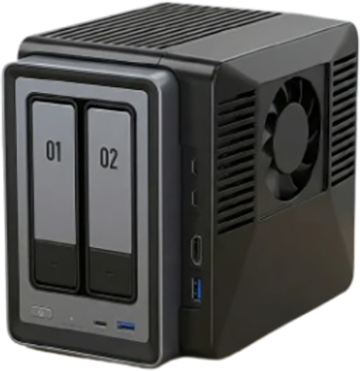
🏠 VP3 Cauldron Hardware
  • NVIDIA Jetson Orin Nano compute
  • High-capacity NAS + NVMe pools
  • OpenClaw AI engine
  • Self-hosted, private, always-on
Ship When These Are True
The initial MVP is successful when VP3 can demonstrate end-to-end voice interaction with structured data rendering.
Launch in a controlled desktop runtime
Obtain and display microphone readiness
Obtain and display camera readiness
Accept a small set of voice commands
Parse commands into structured intents
Pull at least one type of external API data
Normalize result into renderer-friendly schema
Display result in a clear VP3 interaction layer
Support at least one follow-up verbal action on rendered content
Companion Specs in Queue
After this outline, the development team should produce the following companion documents.
📜 Technical Architecture Specification
  • Deeper module contracts
  • IPC definitions
  • State schemas
  • Security policy details
🎙 Voice Command Schema
  • Domains and intents
  • Entity definitions
  • Routing rules
🎨 Render Packet Specification
  • Cards, lists, dashboards, overlays
  • Voice hints standard
🔌 Broker / Provider Adapter Spec
  • Provider structure
  • Normalization rules
  • Caching strategy
  • Audit logging
📷 Device Permission & Input Spec
  • Microphone, camera, motion
  • User indicators
  • Onboarding states
📦 Packaging & Deployment Plan
  • Desktop builds
  • Raspberry Pi ARM64 path
  • Update strategy
  • Appliance deployment notes

Your Voice Runs the Machine

VP3 is a voice-first, multimodal application runtime that pulls data on request, processes it in-app, and renders structured interaction layers you navigate through speech, camera, motion, and direct visual controls.

Launch VP3 View Pitch Deck